
Quick answer
To block Instagram, block the app and instagram.com together, then lock it so the block can't be undone on a bad night. On Android, Sunnah Lock does that with a PIN and Lockdown Mode, and it can also block just Reels if you want to keep your messages. On iPhone, Sunnah Lock blocks the app and the website, enforced by iOS itself.
Instagram is sneaky in a way TikTok isn't. It starts as a place to see your friends. Then you look up and you've watched forty Reels from people you've never met.
So this guide gives you two options: block the whole thing, or keep the parts you actually use and kill the feed. Both take about five minutes.
How much time does Instagram take?
Pew Research found roughly half of US teens use Instagram daily. The more telling number is the trend: the share who say they're on it "almost constantly" went from 8% in 2023 to 12% in 2024.1
When Common Sense Media tracked the phones of 203 kids aged 11 to 17 for a week, the typical Instagram user spent 16 minutes a day on it. That sounds small until you see the top end: the heaviest user averaged close to three hours a day.2 And 16% of the 11 and 12 year olds in that study already used Instagram.2
Who should think about blocking Instagram?
Everyone's different, but the research points at one group again and again: young women and teenage girls.
This isn't outside critics guessing. Meta studied it themselves. Internal research that leaked in 2021, and was later reported by 60 Minutes, found that "Instagram made 1-in-3 teen girls feel worse about their bodies," and that teens who used the app felt higher rates of anxiety and depression.3
Teens say the same thing when asked. In a 2025 Pew survey, 25% of teen girls said social media had hurt their mental health, compared with 14% of boys. Half of girls said it hurt their sleep.4
And when researchers actually took Instagram away, it helped. In a large experiment written up by the National Bureau of Economic Research, people who deactivated Instagram for six weeks reported a small improvement in happiness, depression and anxiety compared with people who kept using it. The effect was strongest for women under 25.5
If that's you, or your daughter, a block isn't an overreaction. It's following the evidence.
What Instagram gives you built in
- Teen Accounts. Since September 2024, under-18 accounts get a daily limit notification after 60 minutes and Sleep Mode from 10pm to 7am, which mutes notifications. Teens under 16 need a parent's permission to loosen these settings.6 A notification is still just a notification, though. It tells you the hour is up. It doesn't end it.
- A new 2-hour cap, not live everywhere yet. In August 2026, Meta agreed in a settlement with a group of US state attorneys general to a 2-hour daily limit for under-18s, combined across Instagram and Facebook. Teens can't turn it off without a parent. It applies in participating US states and is still pending judicial approval.7
For adults, there's nothing that locks. Anything you set, you can unset.
The loopholes that break most Instagram blocks
The website. Delete the app and instagram.com is still in your browser, one search away.
The age on the account. Teen Account protections only apply to accounts Instagram treats as a teen's. The limit lives on the account, not on the phone.
The off switch. A timer you can change in Settings, or a blocker you can uninstall, lasts until the first time you really want to scroll. The block needs a lock.
How to block Instagram on Android
- Get Sunnah Lock from Google Play.
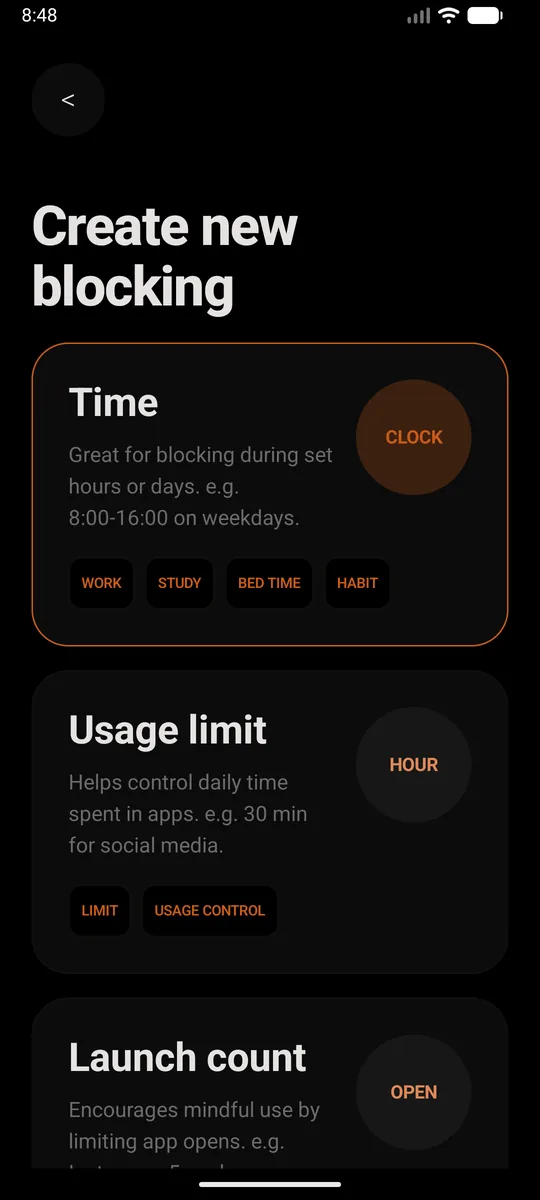
- Create a new block. Pick Time if you want Instagram gone during set hours, like school nights or bedtime. Pick Usage limit if you'd rather allow a little each day, say 30 minutes. Or just set it to all day, every day.
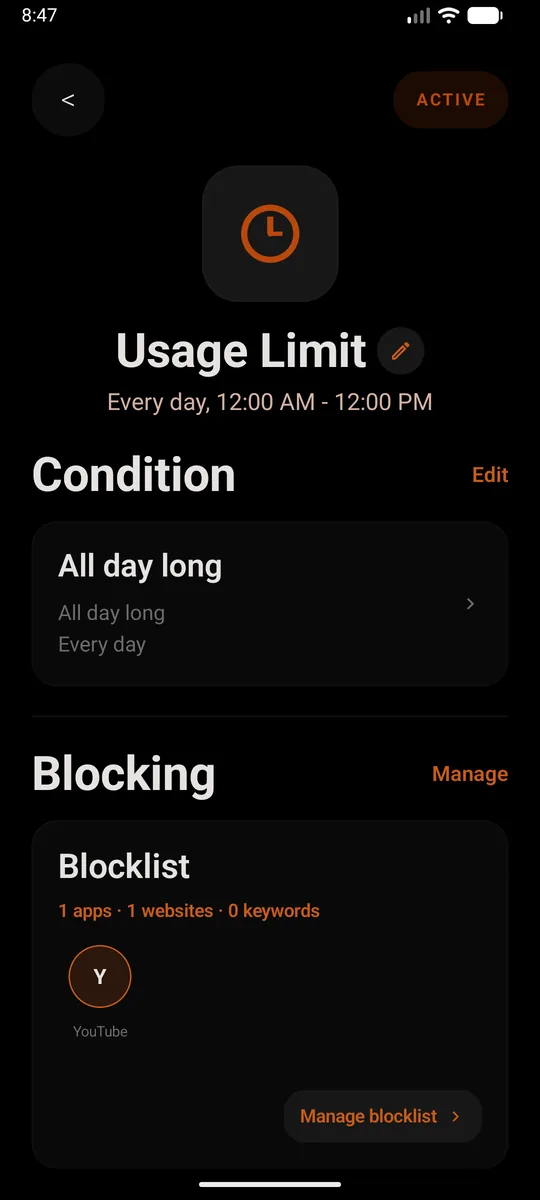
- Add Instagram to the blocklist. Add the app, then add
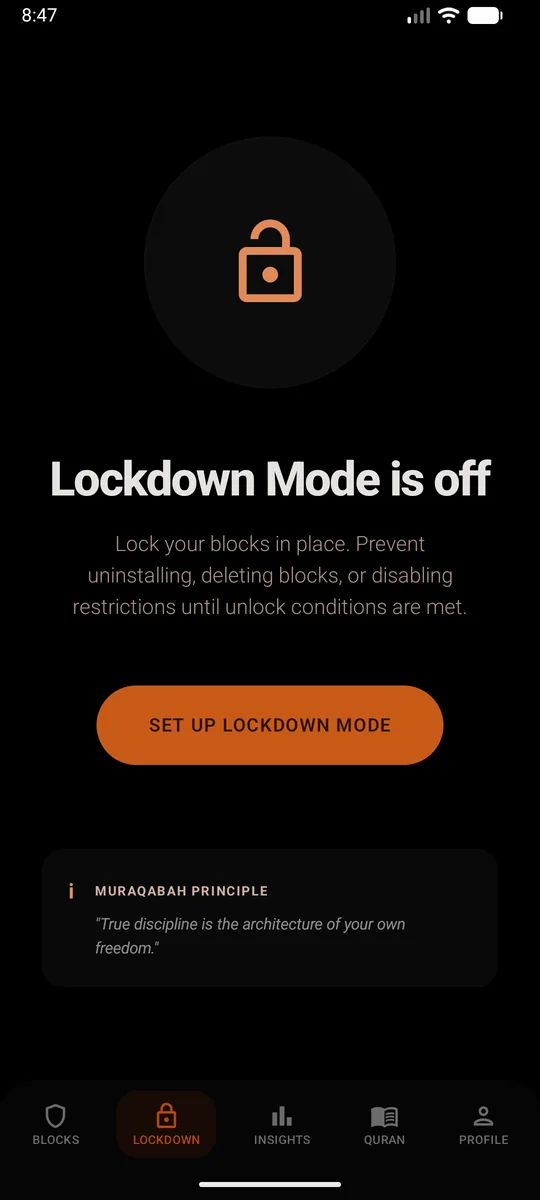
instagram.comas a website too. Skip that second part and the browser becomes the back door. From then on, opening Instagram closes it straight away and shows a reminder instead. - Set a PIN and turn on Lockdown Mode. This is the bit that makes it stick. Lockdown Mode stops the block being deleted, the restrictions being switched off, or Sunnah Lock being uninstalled until your unlock conditions are met.
Or block just Reels
If you still want Instagram for messages and friends' posts, Sunnah Lock on Android has in-app content blocking that blocks Instagram Reels without blocking the whole app. The endless feed disappears, and the useful parts stay.
Without installing anything
Android's Digital Wellbeing can set an app timer: Settings, Digital Wellbeing, App timers, then Instagram. When time runs out, "the app closes and its icon dims."9 It's a reminder more than a lock. Anyone holding the phone can change it, and instagram.com in the browser isn't touched.
How to block Instagram on iPhone
- Get Sunnah Lock from the App Store.
- Build a block. Start from a ready-made template like Night or Home, or build your own from scratch.
- Add Instagram to it, and put
instagram.comon your website list. That covers the app and the site, so Safari doesn't turn into the back door. - Keep the adult content filter on. It's Apple's own filter, and the block is enforced by iOS itself, so it isn't a setting you can talk yourself out of at midnight.
Without installing anything
Screen Time can give Instagram a Time Allowance. When it runs out, "you can tap One More Minute or send a request for more time."8 Fine for a nudge. Not built to hold.
What usually fills the gap
Block Instagram and a lot of people find themselves on TikTok or YouTube Shorts ten minutes later. Same feed, different logo. If that's your pattern, block them together: how to block TikTok and how to block YouTube.
Questions people ask
How do I block Instagram on my phone?
Block the Instagram app and instagram.com together, then lock the block. On Android, use Sunnah Lock with a PIN and Lockdown Mode so the block can't be deleted and the app can't be uninstalled. On iPhone, Sunnah Lock blocks the app and the website, enforced by iOS itself.
Can I block Instagram Reels but keep the rest of Instagram?
On Android, yes. Sunnah Lock's in-app content blocking blocks Instagram Reels without blocking the whole app, so you can still message people and see posts from friends.
Does Instagram have a daily time limit?
Teen Accounts, launched in September 2024, show a daily limit notification after 60 minutes, and teens under 16 need a parent's permission to change the default settings. In August 2026, Meta agreed in a settlement with US state attorneys general to a 2-hour daily limit across Instagram and Facebook for under-18s, pending judicial approval.
Is Instagram bad for teenage girls?
Meta's own internal research, reported by CBS News' 60 Minutes, found Instagram made 1 in 3 teen girls feel worse about their bodies. In a 2025 Pew survey, 25% of teen girls said social media hurt their mental health, compared with 14% of boys.
What happens if you deactivate Instagram for a few weeks?
In a large experiment published through NBER, people who deactivated Instagram for six weeks reported a small improvement in an index of happiness, depression and anxiety compared with people who kept using it. The effect was strongest for women under 25.
Does deleting Instagram stop you using it?
Not really. instagram.com still works in a phone browser, so deleting the app only changes where you scroll. Block the website as well as the app.
Make the block actually hold
On Android, Sunnah Lock blocks apps, websites and keywords, with PIN-protected settings and Lockdown Mode to keep it in place. On iPhone it blocks apps, websites and whole categories, enforced by iOS itself.
Block something else
Sources
- Teens, Social Media and Technology 2024 Pew Research Center, December 2024
- Constant Companion: A Week in the Life of a Young Person's Smartphone Use Common Sense Media, 2023
- Facebook knew Instagram was pushing girls to dangerous content: internal document CBS News, 60 Minutes, December 2022
- Social Media and Teens' Mental Health: What Teens and Their Parents Say Pew Research Center, April 2025
- The Effect of Deactivating Facebook and Instagram on Users' Emotional State National Bureau of Economic Research
- Instagram Teen Accounts announcement Instagram, September 2024
- Meta settlement sparks social media changes for teens: What parents need to know ABC News, August 2026
- Family Sharing and parental controls overview for kids and teens Apple Support, September 2026
- Manage how you spend time on your Android phone with Digital Wellbeing Android Help