
Quick answer
Snapchat gives parents visibility but no way to limit time, so the block has to come from the phone. Block the Snapchat app and snapchat.com together, then lock it. On Android, that's Sunnah Lock with a PIN and Lockdown Mode. On iPhone, Sunnah Lock blocks both and iOS enforces it.
Quick note first, because Google mixes these up: this is about blocking the Snapchat app, so it won't open on the phone at all. If you want to block one person inside Snapchat, that's a setting in their profile, and it's a different job.
Still here? Good. Here's why Snapchat is harder to rein in than most apps, and how to block it on Android and iPhone.
How much does Snapchat take up?
Pew Research found roughly half of US teens go on Snapchat every day.1 But time isn't really how Snapchat gets you. Interruptions are.
When Common Sense Media tracked the phones of 203 kids aged 11 to 17 for a week, the typical kid got a median of 237 notifications a day. Snapchat and Discord sent the most of any apps, and some kids got hundreds from them.2 The median Snapchat user only spent about 10 minutes a day in the app. The pull isn't the minutes. It's how often the app asks you back.
A 10th grader in that study summed up school: "if you track kids at my school, their phone usage, you would definitely see them checking their phones, and then checking Snapchat during class."2
Why Snapchat is hard to quit on your own
Snapchat is where the friends are. Leaving feels like missing out on conversations everyone else is having, and the app leans into that with Streaks that reward you for sending a snap every single day.
That's why an all-day block isn't always the right first move. For a lot of families, the better fix is time-based: Snapchat is fine after homework, and gone during school hours and after bedtime. Sunnah Lock's Time blocks do exactly that.
And cutting back does help. A 2025 meta-analysis of 10 randomised trials found that reducing social media use lowered depressive symptoms. Interestingly, cutting back worked in those trials, while full abstinence on its own didn't reach significance.6
What Snapchat gives parents
Snapchat's parental tool is called Family Center. Here's what it lets you do: see who your teen has chatted with recently (without reading the messages), see their friends and new friends, limit sensitive content, stop My AI replying to them, and request their location.3
In January 2026, Snap added a view of the average time your teen spent on Snapchat each day over the past week, split by chat, camera, Snap Map and Stories.4
Notice what's missing: a limit. Family Center shows you the hours. It has no setting to cap them, and no way to switch Snapchat off at bedtime. That part has to come from outside the app.
The loopholes that break most Snapchat blocks
Snapchat for Web. Snapchat works in a browser. Snapchat for Web has been available to all users worldwide since 2022.5 Block only the app and the browser becomes the new app.
Reinstalling. If a teen can delete the blocker, or delete and reinstall Snapchat, the block is gone in a minute. The blocker itself needs to be locked.
Your phone's timer. Built-in app timers can be changed by whoever's holding the phone. On a teen's phone, that's the teen.
How to block Snapchat on Android
- Get Sunnah Lock from Google Play.
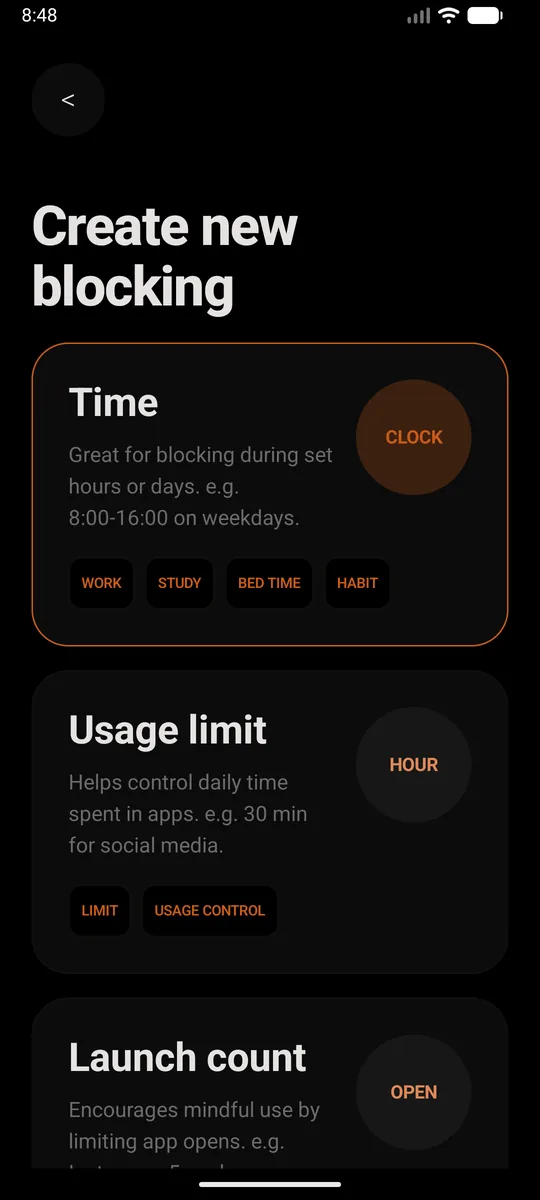
- Create a new block. Pick Time if you want Snapchat gone during set hours, like school nights or bedtime. Pick Usage limit if you'd rather allow a little each day, say 30 minutes. Or just set it to all day, every day.
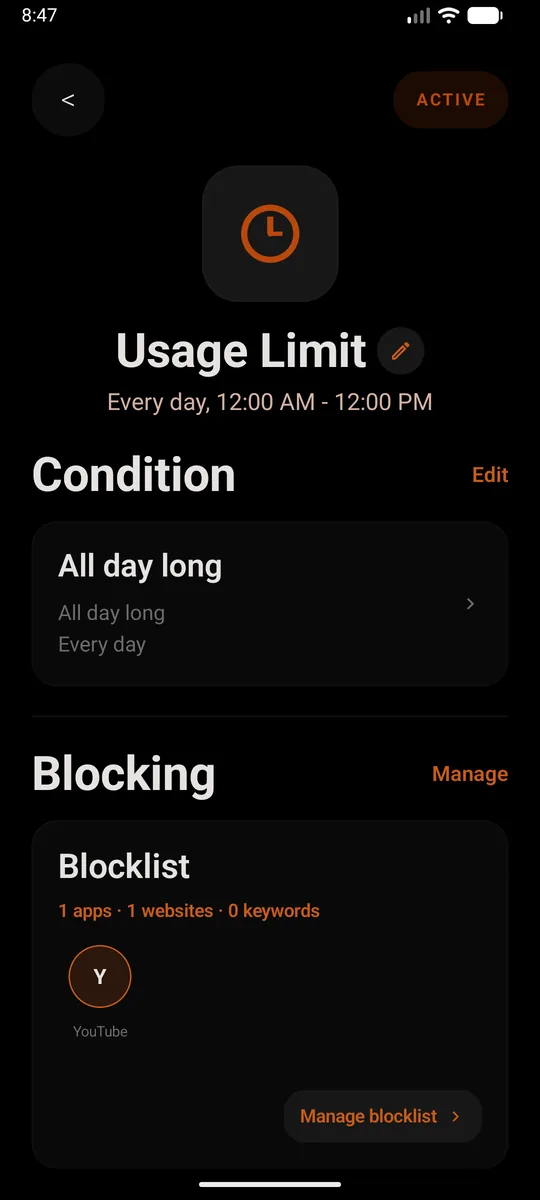
- Add Snapchat to the blocklist. Add the app, then add
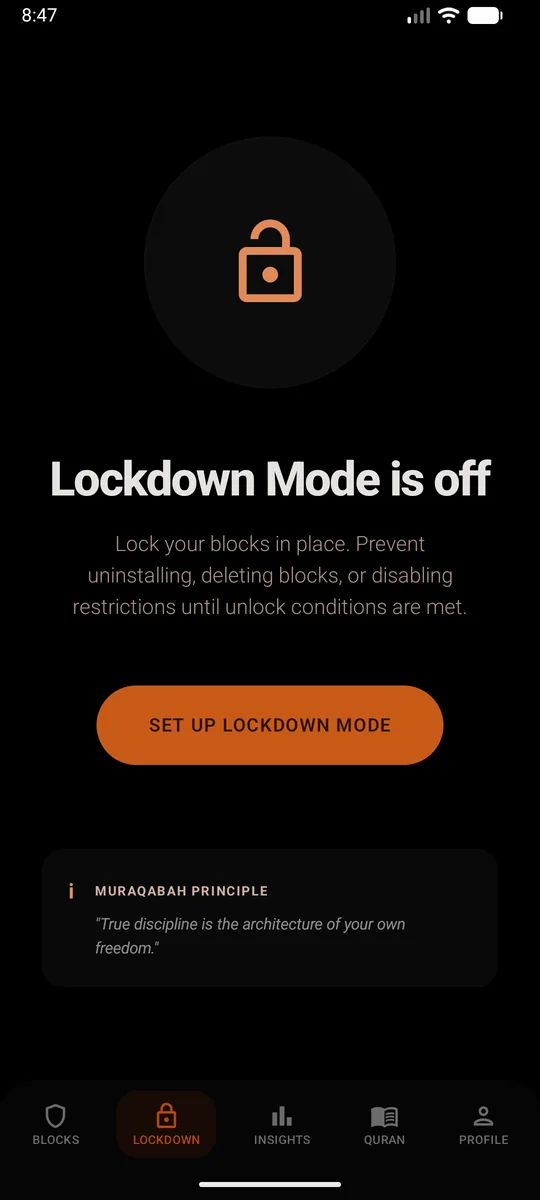
snapchat.comas a website too. Skip that second part and the browser becomes the back door. From then on, opening Snapchat closes it straight away and shows a reminder instead. - Set a PIN and turn on Lockdown Mode. This is the bit that makes it stick. Lockdown Mode stops the block being deleted, the restrictions being switched off, or Sunnah Lock being uninstalled until your unlock conditions are met.
Without installing anything
Go to Settings, Digital Wellbeing, App timers and set a timer on Snapchat. When it runs out, "the app closes and its icon dims" until midnight.7 It doesn't cover Snapchat for Web, and anyone with the phone can change it back.
How to block Snapchat on iPhone
- Get Sunnah Lock from the App Store.
- Build a block. Start from a ready-made template like Night or Home, or build your own from scratch.
- Add Snapchat to it, and put
snapchat.comon your website list. That covers the app and the site, so Safari doesn't turn into the back door. - Keep the adult content filter on. It's Apple's own filter, and the block is enforced by iOS itself, so it isn't a setting you can talk yourself out of at midnight.
Without installing anything
Screen Time can set a Time Allowance on Snapchat. When it's used up, "you can tap One More Minute or send a request for more time."8 On a child's phone in Family Sharing, those requests come to you.
A setup that works for most families
- School hours: a Time block on Snapchat on weekdays, from when school starts to when it ends.
- Bedtime: a second Time block from 9:30pm to 7am, every day.
- The lock: Lockdown Mode on, with a PIN your teen doesn't know.
Snapchat still works for the social part. It just stops running the whole day. If Discord is the other app buzzing all night, see how to block Discord.
Questions people ask
How do I block the Snapchat app on my child's phone?
Install Sunnah Lock on their phone, block the Snapchat app and snapchat.com, then turn on Lockdown Mode with a PIN only you know. On Android that also stops Sunnah Lock being uninstalled. On iPhone, Sunnah Lock blocks the app and the website, enforced by iOS itself.
Does Snapchat have parental controls or a time limit?
Snapchat has Family Center, which lets a parent see who their teen has chatted with, see their friends, limit sensitive content and request their location. Since January 2026 it also shows how long the teen spent on Snapchat each day. It has no setting that limits or blocks that time.
Can you use Snapchat without the app?
Yes. Snapchat for Web has been available to all users worldwide since 2022, so deleting or blocking only the app still leaves Snapchat open in a browser. Block snapchat.com as well.
How much time do teens spend on Snapchat?
Pew Research found roughly half of US teens use Snapchat every day, and about one in ten say they're on it almost constantly. In a Common Sense Media study that tracked kids' phones, the heaviest Snapchat user averaged more than three hours a day.
Why does Snapchat send so many notifications?
In a Common Sense Media study of 203 kids' phones, Snapchat and Discord sent the most notifications of any apps, with some kids getting hundreds a day from them. Every notification is an invitation to open the app again.
How is this different from blocking someone on Snapchat?
Blocking someone on Snapchat stops one person contacting you, inside the app. Blocking the Snapchat app stops the whole app opening on the phone. This guide covers the second one.
Make the block actually hold
On Android, Sunnah Lock blocks apps, websites and keywords, with PIN-protected settings and Lockdown Mode to keep it in place. On iPhone it blocks apps, websites and whole categories, enforced by iOS itself.
Block something else
Sources
- Teens, Social Media and Technology 2024 Pew Research Center, December 2024
- Constant Companion: A Week in the Life of a Young Person's Smartphone Use Common Sense Media, 2023
- What is Family Center? Snapchat Support
- Offering Parents Deeper Insights with Snapchat's New Family Center Features Snap Newsroom, January 2026
- Snapchat for Web is now available to all users worldwide TechCrunch, September 2022
- Reducing Social Media Use Decreases Depression Symptoms: A Meta-Analysis of Randomised Controlled Trials European Journal of Investigation in Health, Psychology and Education, November 2025
- Manage how you spend time on your Android phone with Digital Wellbeing Android Help
- Family Sharing and parental controls overview for kids and teens Apple Support, September 2026