
Quick answer
Block the TikTok app and tiktok.com together, then lock the block so nobody can switch it off in the moment. On Android, that's Sunnah Lock with a PIN and Lockdown Mode. On iPhone, Sunnah Lock blocks both and iOS enforces it. TikTok's own 60-minute limit ends with a passcode screen the teen can get past themselves.
TikTok is the app people most often come here to block, and there's a reason. It's built so there's never a natural place to stop.
Here's what the research says it costs, why TikTok's own limit doesn't do much, and how to block it on Android and iPhone in about five minutes.
How much time does TikTok actually take?
A lot more than kids think, and more than any other app on their phone.
The first two numbers come from Common Sense Media. Researchers put a tracking app on the phones of 203 US kids aged 11 to 17 and recorded a full week. Half of them used TikTok. The typical user spent nearly two hours a day on it, and the heaviest users averaged more than seven hours a day. No other app came close. YouTube, in second place, had a median of 40 minutes.1
It starts young, too. Among the 11 and 12 year olds in that study, 47% already used TikTok.1
Pew Research puts it at about 6 in 10 US teens using TikTok every day.2
Why is TikTok so hard to put down?
The kids in that study explained it better than any expert could. One 11th grader put it like this: on YouTube "you have to search for something," but "on TikTok it's really just there." Videos start on their own, there's no decision to make, and each one is short enough to feel harmless.1
That's exactly why "I'll just watch for ten minutes" turns into an hour. There's no end of the episode. There's no moment where the app asks you to choose. Blocking works because it puts the decision back before you open the app, not halfway through the feed.
Should you block TikTok completely?
If you're asking, the answer is probably yes, at least for a while.
Teens themselves are worried. In a 2025 Pew survey, 45% said they spend too much time on social media, up from 36% in 2022. And 48% said social media has a mostly negative effect on people their age.3
Sleep is where it shows first. TikTok was one of the apps kids commonly used between midnight and 5am on school nights. One 10th grader said: "for certain apps, like TikTok, it's really hard to fall asleep once you use it close to when you're gonna go to sleep."1 Even if you don't block TikTok all day, blocking it at night is an easy win.
Cutting back helps. A 2025 meta-analysis of 10 randomised trials found that reducing social media use lowered depressive symptoms, and that trials of just one to three weeks were enough to see it.4
What TikTok gives you built in
- The 60-minute limit. Every account under 18 gets a 60-minute daily limit by default. But when it's reached, the teen is "prompted to enter a passcode in order to continue watching." TikTok calls this an active decision. In practice, it's a teen typing a code they already know. Under-13 accounts need a parent to enter it.5
- Family Pairing. A parent links their account to their teen's and can set different daily limits for different days, see a screen time dashboard, and mute notifications on a schedule.5 It's the strongest thing TikTok offers. It still only works inside TikTok, and only while the accounts stay linked.
The loopholes that break most TikTok blocks
The website. Delete or limit the app and tiktok.com is still there in the browser.
The account. TikTok's limits are settings on a TikTok account, not on the phone. A block on the phone itself doesn't care which account is signed in.
Switching the blocker off. If a teen can open Settings and turn off the timer, or uninstall the blocking app, the block lasts until the first bad day. That's why the lock matters more than the block.
How to block TikTok on Android
- Get Sunnah Lock from Google Play.
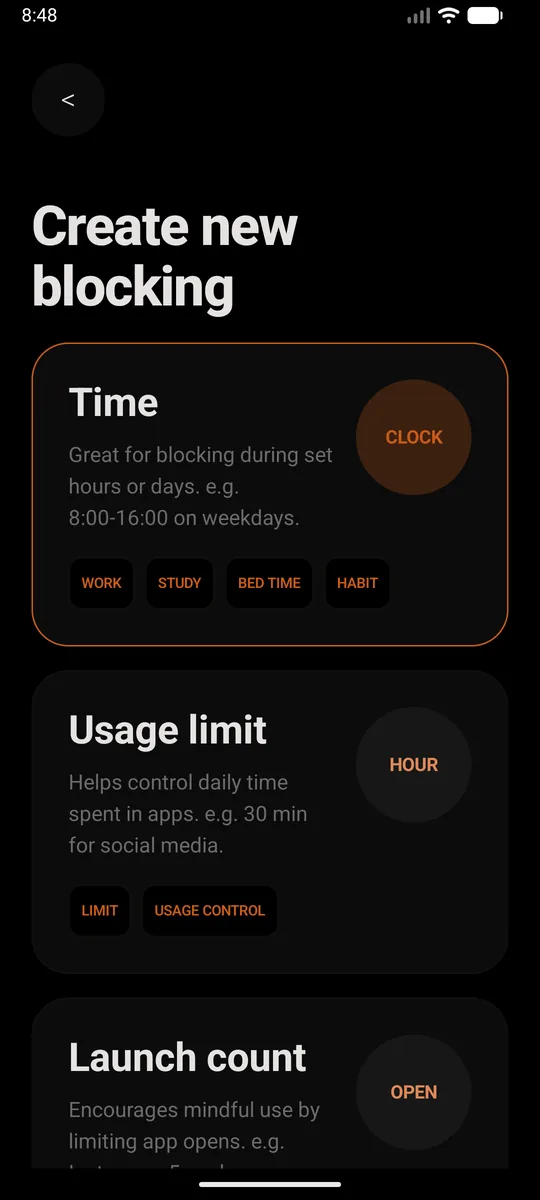
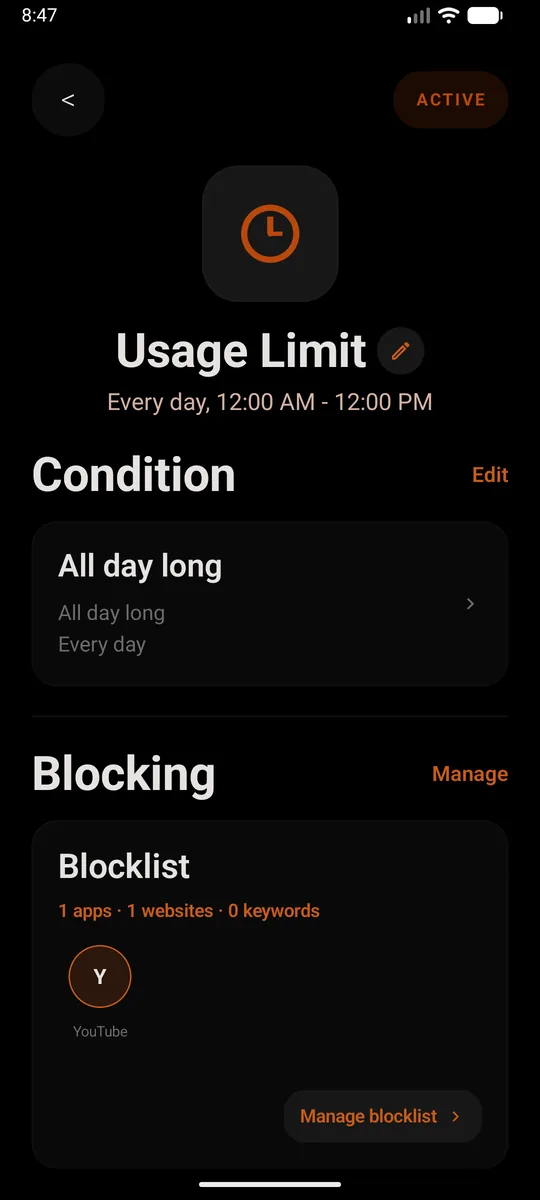
- Create a new block. Pick Time if you want TikTok gone during set hours, like school nights or bedtime. Pick Usage limit if you'd rather allow a little each day, say 30 minutes. Or just set it to all day, every day.
- Add TikTok to the blocklist. Add the app, then add
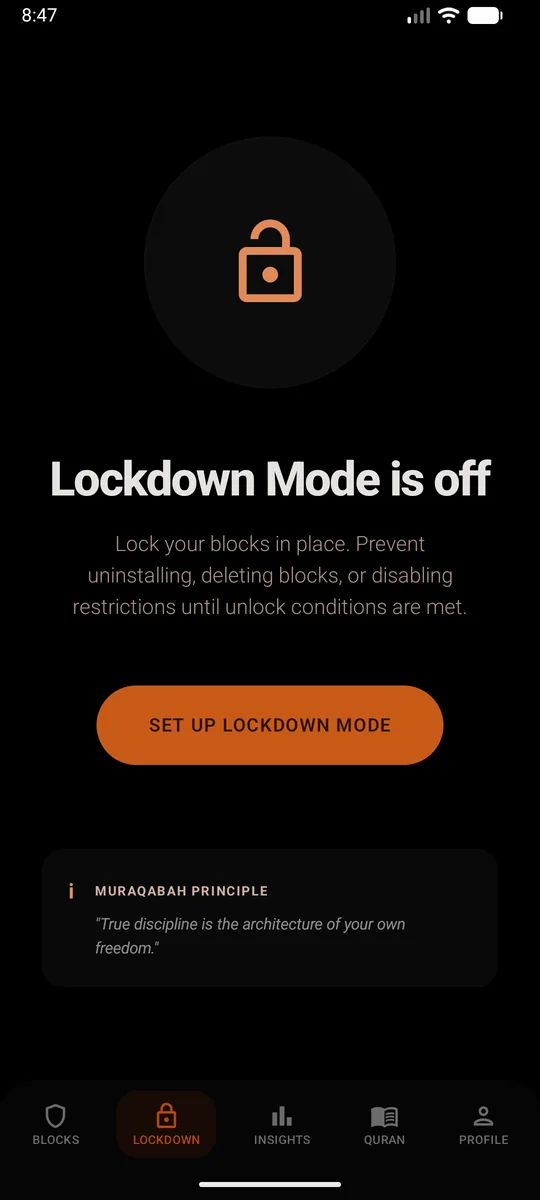
tiktok.comas a website too. Skip that second part and the browser becomes the back door. From then on, opening TikTok closes it straight away and shows a reminder instead. - Set a PIN and turn on Lockdown Mode. This is the bit that makes it stick. Lockdown Mode stops the block being deleted, the restrictions being switched off, or Sunnah Lock being uninstalled until your unlock conditions are met.
Without installing anything
Go to Settings, Digital Wellbeing, App timers and set a timer on TikTok. When time's up, "the app closes and its icon dims."6 It's easy to set up. It's just as easy to change back, and it does nothing about tiktok.com in the browser.
How to block TikTok on iPhone
- Get Sunnah Lock from the App Store.
- Build a block. Start from a ready-made template like Night or Home, or build your own from scratch.
- Add TikTok to it, and put
tiktok.comon your website list. That covers the app and the site, so Safari doesn't turn into the back door. - Keep the adult content filter on. It's Apple's own filter, and the block is enforced by iOS itself, so it isn't a setting you can talk yourself out of at midnight.
Without installing anything
Screen Time can put a Time Allowance on TikTok. When the allowance runs out, Apple's own guide says "you can tap One More Minute or send a request for more time."7 On a child's phone managed through Family Sharing, the request comes to you. On your own phone, you're the one approving it.
Not ready to go all the way?
Try a bedtime block first. Set a Time block in Sunnah Lock from 9:30pm to 7am and leave TikTok alone during the day. Most people find that once the late-night scroll is gone, the daytime pull gets weaker too.
Instagram Reels and YouTube Shorts are the same format with a different logo, so if TikTok goes, those tend to fill the gap. See how to block Instagram and how to block YouTube.
Questions people ask
How do I block TikTok on my phone completely?
Block the TikTok app and tiktok.com together, then lock the block. On Android, Sunnah Lock does both and Lockdown Mode stops the block being removed or the app being uninstalled. On iPhone, Sunnah Lock blocks the app and the website, enforced by iOS itself.
Does TikTok have a daily time limit?
Yes, for under-18 accounts TikTok sets a 60-minute daily limit by default. When it's reached, the teen is asked for a passcode to keep watching, so they can extend it themselves. For under-13 accounts, a parent has to enter the passcode.
What is TikTok Family Pairing?
Family Pairing links a parent's TikTok account to their teen's. The parent can set custom daily time limits for different days of the week, see a screen time dashboard, and mute notifications on a schedule. It only works inside TikTok, so it doesn't affect anything else on the phone.
Can my child get around a TikTok block?
The usual ways are opening tiktok.com in a browser, reinstalling the app, or switching off the blocking app. Blocking both the app and the website, and locking the blocker with a PIN and Lockdown Mode, closes all three on Android.
How much time do kids spend on TikTok?
In a Common Sense Media study that tracked the phones of 203 US kids aged 11 to 17, the median TikTok user spent 1 hour 52 minutes a day on it. Some spent more than seven hours. For the typical TikTok user, it made up 38% of all their phone time.
Is TikTok bad for sleep?
Teens in the same Common Sense Media study said so themselves. TikTok was commonly used between midnight and 5am on school nights, and one 10th grader said it's really hard to fall asleep after using it close to bedtime.
Make the block actually hold
On Android, Sunnah Lock blocks apps, websites and keywords, with PIN-protected settings and Lockdown Mode to keep it in place. On iPhone it blocks apps, websites and whole categories, enforced by iOS itself.
Block something else
Sources
- Constant Companion: A Week in the Life of a Young Person's Smartphone Use Common Sense Media, 2023
- Teens, Social Media and Technology 2024 Pew Research Center, December 2024
- Social Media and Teens' Mental Health: What Teens and Their Parents Say Pew Research Center, April 2025
- Reducing Social Media Use Decreases Depression Symptoms: A Meta-Analysis of Randomised Controlled Trials European Journal of Investigation in Health, Psychology and Education, November 2025
- New features for teens and families on TikTok TikTok Newsroom, March 2023
- Manage how you spend time on your Android phone with Digital Wellbeing Android Help
- Family Sharing and parental controls overview for kids and teens Apple Support, September 2026