
Quick answer
To block YouTube properly, block the app and youtube.com, then lock the block so it can't be undone in a weak moment. On Android, that's Sunnah Lock with Lockdown Mode on. On iPhone, Sunnah Lock blocks both and iOS enforces it. YouTube's own reminders and limits all have a dismiss button, which is why they rarely work.
You probably don't need convincing. You're here because you've opened YouTube "for one video" and looked up an hour later. Or you've watched it happen to your kid.
So this guide skips the lecture. It covers what YouTube really costs you, why the usual fixes fail, and the exact steps to block it on Android and iPhone in about five minutes.
How much time does YouTube actually take?
YouTube reaches more teens every day than any other app. It isn't the biggest time sink per user, since TikTok users spend almost three times as long on TikTok. But YouTube is the one almost every kid has open, and it's the one running at night.
That middle number comes from Common Sense Media, which didn't just ask kids how long they watch. It installed a tracking app on the phones of 203 US kids aged 11 to 17 and watched for a week. YouTube was on 86% of those phones. The median user spent 40 minutes a day on it, and one kid averaged more than ten hours a day.2
The overnight number is the one that should worry parents. Over half the kids in the study used their phones between midnight and 5am on school nights. For the ones who watched YouTube in those hours, it took up almost half of their overnight phone time. The researchers think a lot of that was kids leaving it running with music or white noise. Either way, the phone is awake while the kid should be asleep.2
Should you block YouTube completely?
Honest answer: it depends on what YouTube is doing for you.
If you use it for a recipe or a car repair and then close it, you're fine. If you open it without a reason, if Shorts eat your evenings, or if it's the last thing you see before sleep, blocking it is the easier fight. Willpower loses to an algorithm built to keep you watching.
The research backs up cutting back. Nobody has run a trial on YouTube alone yet. But a 2025 meta-analysis pooled 10 randomised trials with 1,491 people and found that reducing social media use lowered depressive symptoms. The effect was small but real, and it showed up in trials as short as one to three weeks.3 Interestingly, the reduced-use groups drove that result, not the cold-turkey groups. So a strict daily limit can be just as useful as a total ban.
What YouTube gives you built in
YouTube does have a couple of tools. They're worth knowing about, mostly so you understand why they don't hold.
- Take a Break reminder. It pauses your video after a set amount of time. It's on by default for ages 13 to 17 and off for adults. The catch: the video stays paused only "until you dismiss it or resume playing." The timer also resets when you close the app or switch devices.4
- Shorts feed limit. You can set a daily limit on the Shorts feed, even all the way down to zero. When you hit it, a message pops up. You can dismiss it and keep scrolling.5
Both are speed bumps. They work great for someone who didn't really want to keep watching. They do nothing for someone who does.
The loopholes that break most YouTube blocks
Most blocks fail for one of three reasons.
The browser. Delete the app, and youtube.com still opens in Chrome or Safari. Block the app with a timer, same thing. If your block doesn't cover the website, it's not a block.
The dismiss button. Every built-in limit above, plus Android's app timers and iPhone's Screen Time, gives you a way out. On iPhone, hitting your limit offers "One More Minute."8 One more minute is how the last hour happened.
The settings screen. If the same person who wants to watch can switch the block off, they will, usually at 11pm. A block needs a lock that sits outside your reach in that moment: a PIN, or a mode that can't be turned off early.
How to block YouTube on Android
This covers the app, the website and the uninstall button in one go.
- Get Sunnah Lock from Google Play.
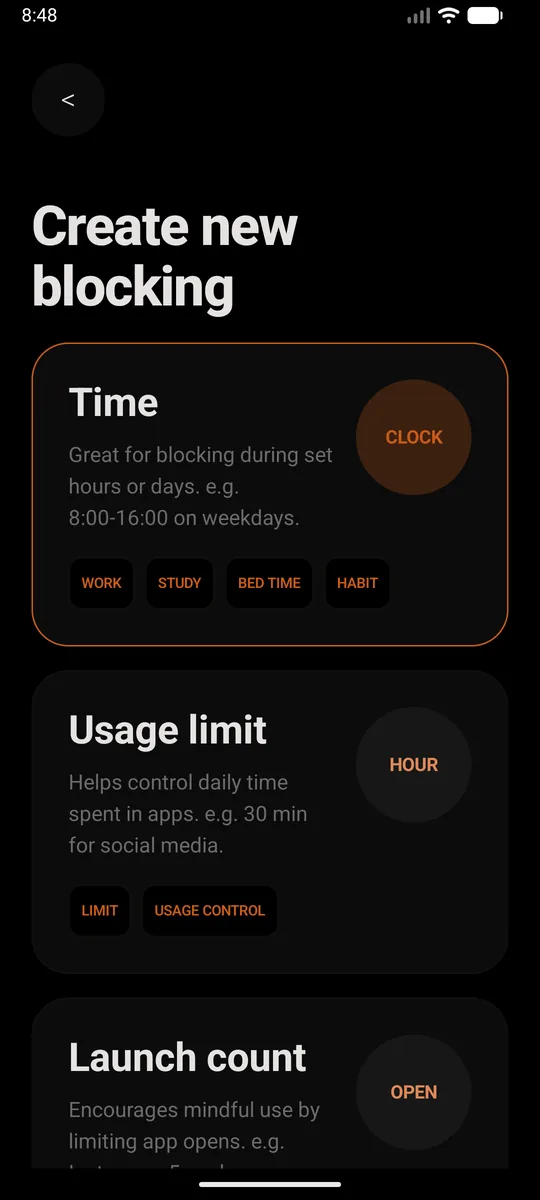
- Create a new block. Pick Time if you want YouTube gone during set hours, like school nights or bedtime. Pick Usage limit if you'd rather allow a little each day, say 30 minutes. Or just set it to all day, every day.
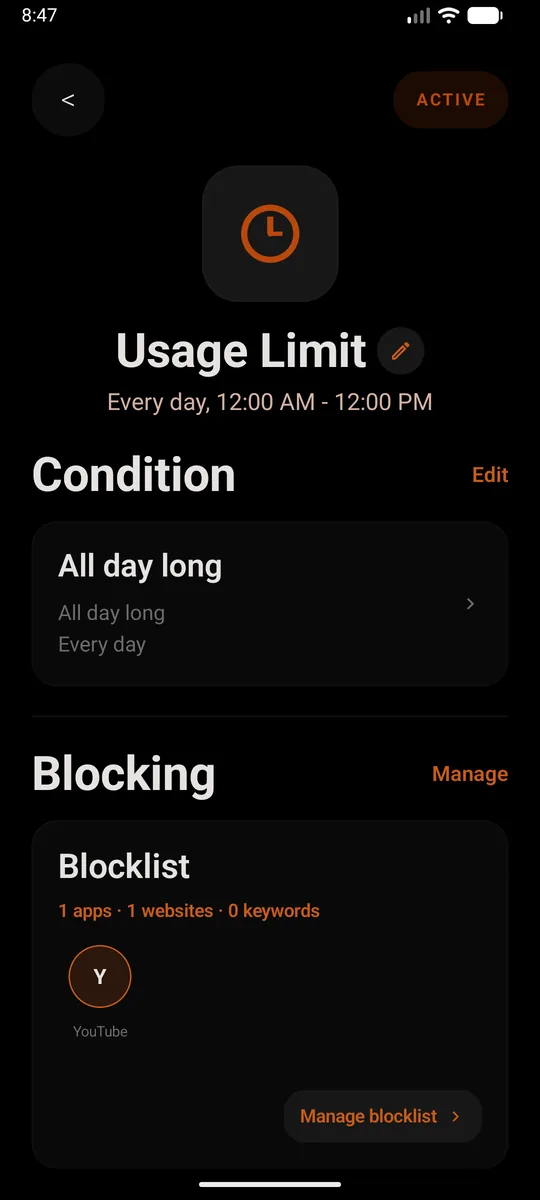
- Add YouTube to the blocklist. Add the app, then add
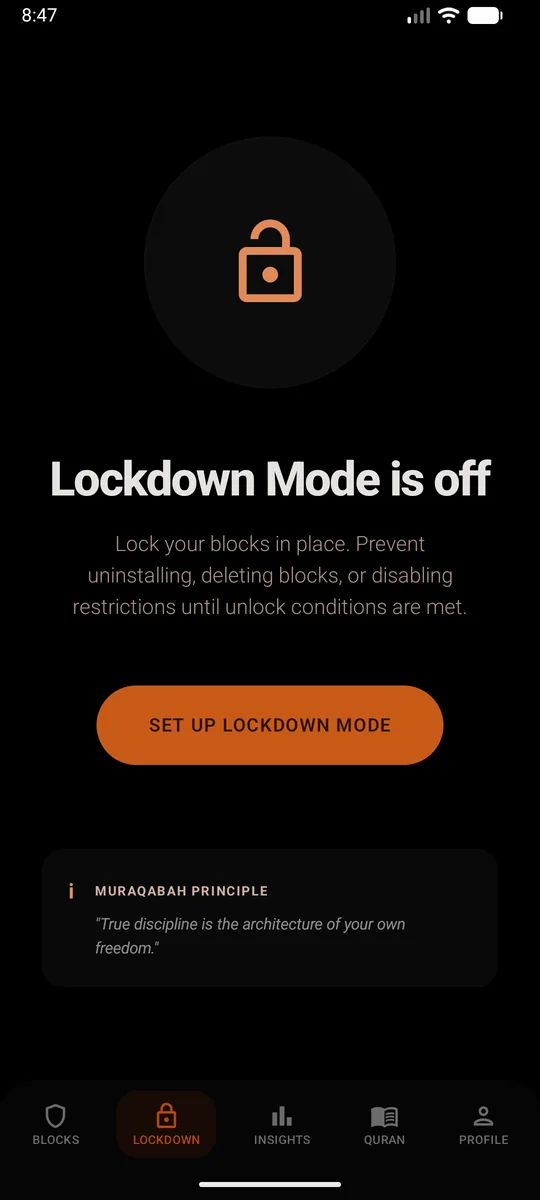
youtube.comas a website too. Skip that second part and the browser becomes the back door. From then on, opening YouTube closes it straight away and shows a reminder instead. - Set a PIN and turn on Lockdown Mode. This is the bit that makes it stick. Lockdown Mode stops the block being deleted, the restrictions being switched off, or Sunnah Lock being uninstalled until your unlock conditions are met.
Without installing anything
Android has Digital Wellbeing built in. Go to Settings, Digital Wellbeing, App timers, tap Set timer next to YouTube and pick a time. When it runs out, "the app closes and its icon dims" until midnight.6 It's a decent start, but anyone holding the phone can open Settings and change it, and it doesn't touch youtube.com in the browser.
For a child's phone, Google Family Link lets you set app limits from your own phone: Screen time, Time limits, App limits, then pick YouTube.7 Better, because your kid can't edit it. The browser gap is still there, though.
How to block YouTube on iPhone
Same idea: cover the app and the website, and make it hold.
- Get Sunnah Lock from the App Store.
- Build a block. Start from a ready-made template like Night or Home, or build your own from scratch.
- Add YouTube to it, and put
youtube.comon your website list. That covers the app and the site, so Safari doesn't turn into the back door. - Keep the adult content filter on. It's Apple's own filter, and the block is enforced by iOS itself, so it isn't a setting you can talk yourself out of at midnight.
Without installing anything
Apple's Screen Time lets you set Time Allowances for apps. It's solid for awareness. But when you hit the limit, "you can tap One More Minute or send a request for more time."8 If you're setting it for yourself, you're the one holding the Screen Time passcode, so it's a limit you can always talk yourself past.
Just want Shorts gone?
Lots of people don't mind long videos. It's the endless Shorts feed that gets them.
On Android, Sunnah Lock has in-app content blocking that stops YouTube Shorts without blocking the whole app. You keep your tutorials and lectures, and the feed that never ends just isn't there. It does the same for Instagram Reels, if that's your other weak spot. See how to block Instagram.
On a computer too?
If YouTube follows you to a Windows laptop, the phone block won't reach it. Our guide on blocking apps and websites on Windows 11 covers the built-in options that work today. Already running Cold Turkey there? It stops at the computer, so see what to pair Cold Turkey with on your phone.
Questions people ask
Can you block YouTube completely on a phone?
Yes. On Android, add both the YouTube app and youtube.com to a Sunnah Lock block, then turn on Lockdown Mode so the block can't be deleted. On iPhone, Sunnah Lock blocks the app and the website, enforced by iOS itself. Blocking only the app leaves the browser open, so always do both.
Does deleting the YouTube app stop YouTube?
No. youtube.com still works in Chrome, Safari or any other browser, and it takes about ten seconds to find. Deleting the app changes where you watch, not whether you watch.
Can I block YouTube Shorts but keep regular YouTube?
On Android, yes. Sunnah Lock's in-app content blocking stops YouTube Shorts without blocking the whole app. YouTube's own Shorts feed limit can also be set to zero, but you can dismiss the message when you hit it.
Does YouTube have a built-in time limit?
Sort of. The Take a Break reminder pauses your video after a set time, and it's on by default for ages 13 to 17 and off for adults. But it waits until you dismiss it or press play, so it's a nudge, not a block.
How do I block YouTube on my child's phone?
Put Sunnah Lock on their phone, block the YouTube app and youtube.com, and turn on Lockdown Mode with a PIN only you know. On Android that also stops the app being uninstalled. Google Family Link can set app limits too, but it can't block the website in other browsers.
Is watching less YouTube actually good for you?
There's no study on YouTube alone yet. A 2025 meta-analysis of 10 randomised trials found that cutting back on social media reduced depressive symptoms, with a small but real effect. The same logic applies to any feed you can't stop scrolling.
Make the block actually hold
On Android, Sunnah Lock blocks apps, websites and keywords, with PIN-protected settings and Lockdown Mode to keep it in place. On iPhone it blocks apps, websites and whole categories, enforced by iOS itself.
Block something else
Sources
- Teens, Social Media and Technology 2024 Pew Research Center, December 2024
- Constant Companion: A Week in the Life of a Young Person's Smartphone Use Common Sense Media, 2023
- Reducing Social Media Use Decreases Depression Symptoms: A Meta-Analysis of Randomised Controlled Trials European Journal of Investigation in Health, Psychology and Education, November 2025
- Take a break reminder YouTube Help
- Set a Shorts feed limit YouTube Help
- Manage how you spend time on your Android phone with Digital Wellbeing Android Help
- Set app time limits on your child's device Google For Families Help
- Family Sharing and parental controls overview for kids and teens Apple Support, September 2026