
Quick answer
On your child's phone, block the Roblox app and roblox.com together, then lock the block with a PIN they don't know. On Android, Sunnah Lock does this and Lockdown Mode stops the app being uninstalled. On iPhone, Sunnah Lock blocks the app and the website, enforced by iOS itself. Roblox's own daily limit is decent, but it only covers the Roblox account it's set on.
If you're a parent reading this, you're probably worried about one of two things. Either Roblox is eating every free hour, or you've read the news about who kids meet on it. Maybe both.
This guide covers both. It shows what Roblox's own controls do well, where they stop, and how to block Roblox properly on Android and iPhone.
How big is Roblox, really?
Roblox's own results for the first quarter of 2026 reported 132 million daily active users and 31 billion hours engaged, up 43% on a year before.1
When Common Sense Media tracked the phones of 203 US kids aged 11 to 17 for a week, 37% of them played Roblox on their phone. The typical player's phone time on it was short, about 6 minutes a day. The heaviest player averaged more than six hours.2 That spread is the point: for most kids it's a game, and for some it takes over.
The same study noticed something about mobile games in general. Some "send notifications to re-engage the player every day," while others are designed so kids feel they have to keep checking in to keep their progress.2
The safety question
Time isn't the only reason parents block Roblox.
US states including Louisiana have sued Roblox over child safety. In August 2025, Louisiana's attorney general filed a lawsuit alleging Roblox "has and continues to facilitate the distribution of child sexual abuse material and the sexual exploitation of Louisiana's children." The suit says adults can pose as children on the platform, and kids can get around age requirements.3
Roblox pushes back. A spokesperson said the company dedicates "substantial resources, including advanced technology and 24/7 human moderation, to help detect and prevent inappropriate content and behavior."3
You don't need to settle that argument to make a call for your own kid. If your child is young, or you can't sit nearby while they play, a full block until they're older is a reasonable choice.
What Roblox gives parents
Credit where it's due: Roblox has a real screen time limit. A parent account linked to your child's account can set a daily limit, and "once they reach their limit, your child will see a message explaining that they have hit their limit, and they will no longer be able to use Roblox for the rest of the day."4
That's better than most apps, which only send a reminder. Its limits are about where it lives:
- It's set on one Roblox account. A second account doesn't carry the limit.
- It controls time, not who your child talks to while that time is running.
The loopholes kids actually use
Other devices. Roblox also runs on computers, tablets and consoles. A phone block covers the phone, so think about the family laptop too.
Another account. Parental controls sit on an account. Kids who want more time know how to make a new one.
Deleting the blocker. If your child can uninstall the app doing the blocking, they will. On Android, Lockdown Mode is what stops that.
How to block Roblox on Android
- Get Sunnah Lock from Google Play.
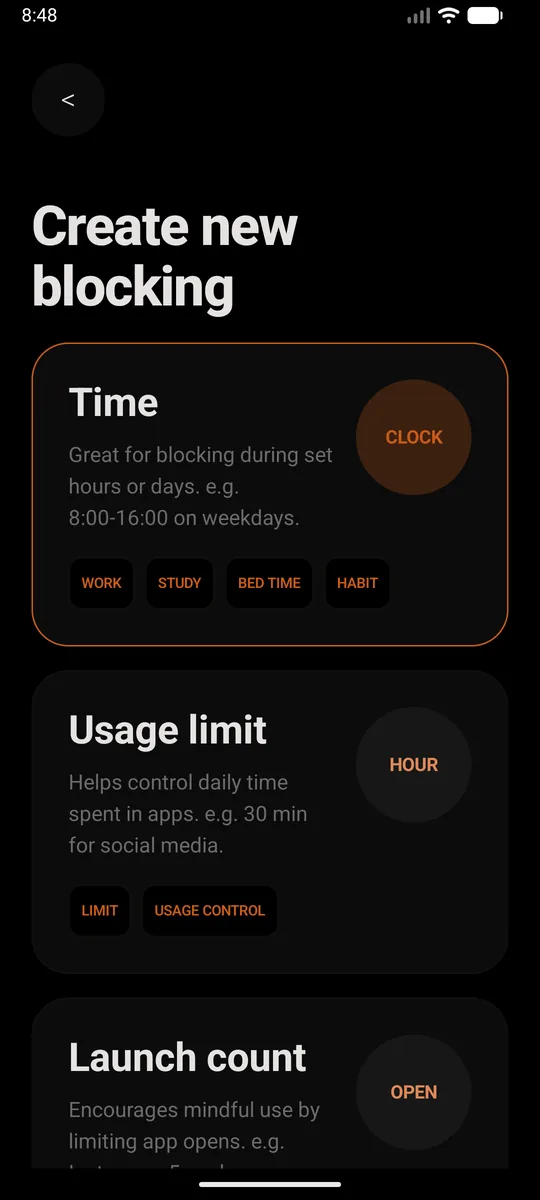
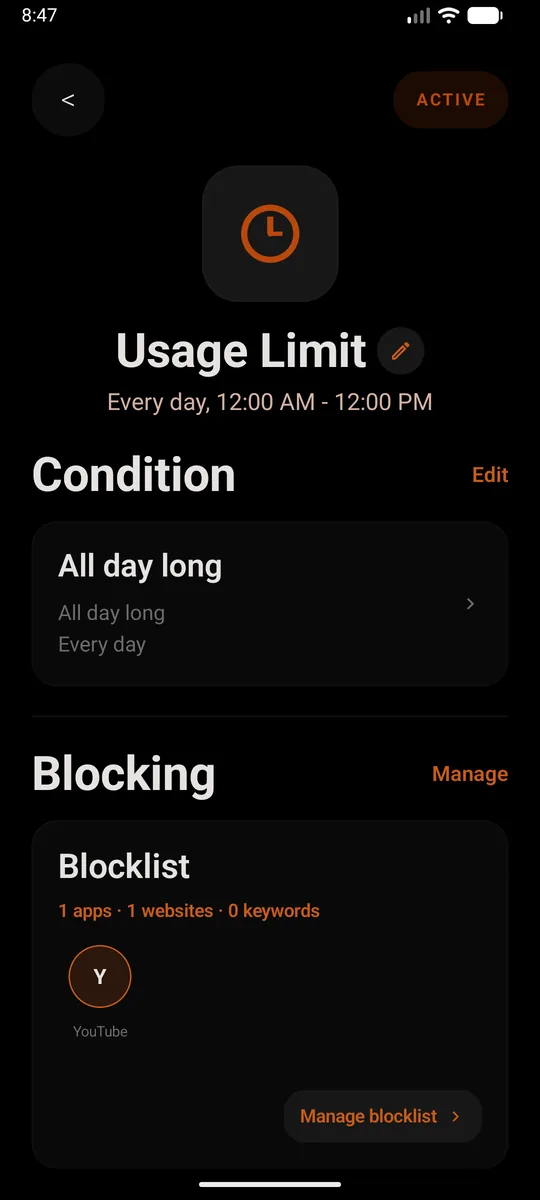
- Create a new block. Pick Time if you want Roblox gone during set hours, like school nights or bedtime. Pick Usage limit if you'd rather allow a little each day, say 30 minutes. Or just set it to all day, every day.
- Add Roblox to the blocklist. Add the app, then add
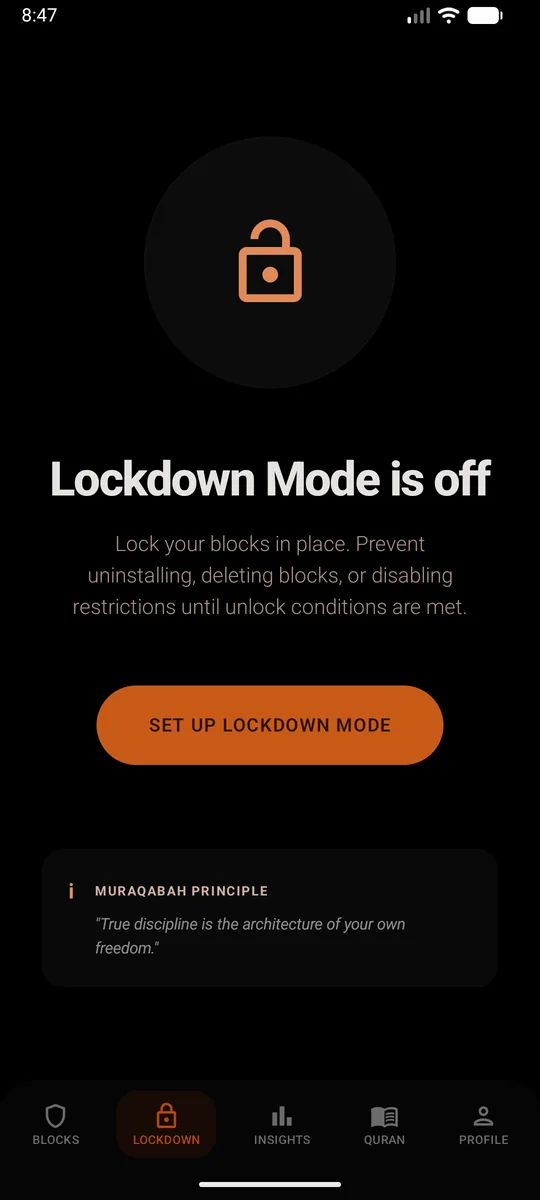
roblox.comas a website too. Skip that second part and the browser becomes the back door. From then on, opening Roblox closes it straight away and shows a reminder instead. - Set a PIN and turn on Lockdown Mode. This is the bit that makes it stick. Lockdown Mode stops the block being deleted, the restrictions being switched off, or Sunnah Lock being uninstalled until your unlock conditions are met.
Without installing anything
Google Family Link can set app limits on a child's phone from your own: Screen time, Time limits, App limits, then choose Roblox.5 It's solid for time. It doesn't block roblox.com in other browsers.
How to block Roblox on iPhone
- Get Sunnah Lock from the App Store.
- Build a block. Start from a ready-made template like Night or Home, or build your own from scratch.
- Add Roblox to it, and put
roblox.comon your website list. That covers the app and the site, so Safari doesn't turn into the back door. - Keep the adult content filter on. It's Apple's own filter, and the block is enforced by iOS itself, so it isn't a setting you can talk yourself out of at midnight.
Without installing anything
If your child's iPhone is in your Family Sharing group, you can set a Time Allowance for Roblox from your phone. When it runs out, your child can "tap One More Minute or send a request for more time," and the request comes to you.6
A middle ground: weekends only
Not ready for a full ban? Set a Time block in Sunnah Lock that keeps Roblox closed on school days. Weekends stay fun, school nights stay calm, and it's one rule instead of a daily argument.
If your child also uses Discord to chat with people they met in games, read how to block Discord too.
Questions people ask
How do I block Roblox on my child's phone?
Install Sunnah Lock on your child's phone, block the Roblox app and roblox.com, then turn on Lockdown Mode with a PIN only you know. On Android that also stops the app being uninstalled. On iPhone, Sunnah Lock blocks the app and the website, enforced by iOS itself.
Does Roblox have parental controls?
Yes. Roblox lets a linked parent account set a daily screen time limit. Once your child reaches it, Roblox shows a message and they can't use Roblox for the rest of the day. Those controls live on your child's Roblox account, so they don't cover a different account or anything outside Roblox.
Why are states suing Roblox?
US states including Louisiana have sued Roblox over child safety. Louisiana's lawsuit, filed in August 2025, says Roblox facilitates the sexual exploitation of children and doesn't put basic safety controls in place. Roblox says it uses advanced technology and 24/7 human moderation to detect and prevent inappropriate content.
Does blocking Roblox on the phone stop it everywhere?
No. Roblox also runs on computers, tablets and game consoles. A phone block covers the phone, so check every other device your child can play on.
How long do kids play Roblox each day?
In a Common Sense Media study that tracked the phones of 203 US kids aged 11 to 17, 37% played Roblox. The median player spent 6 minutes a day on the phone app, but the heaviest player averaged more than six hours a day.
Should I block Roblox completely or set a time limit?
If your worry is time, a daily limit or a weekend-only schedule works. If your worry is who your child is talking to, a full block is safer until they're older, because a time limit doesn't change who can reach them while they're playing.
Make the block actually hold
On Android, Sunnah Lock blocks apps, websites and keywords, with PIN-protected settings and Lockdown Mode to keep it in place. On iPhone it blocks apps, websites and whole categories, enforced by iOS itself.
Block something else
Sources
- Roblox Reports First Quarter 2026 Financial Results Roblox Investor Relations, April 2026
- Constant Companion: A Week in the Life of a Young Person's Smartphone Use Common Sense Media, 2023
- Louisiana attorney general sues Roblox TechCrunch, August 2025
- Managing Screen Time Roblox Support
- Set app time limits on your child's device Google For Families Help
- Family Sharing and parental controls overview for kids and teens Apple Support, September 2026