
Quick answer
On your child's phone, block the Discord app and discord.com together, then lock the block with a PIN they don't know. On Android, Sunnah Lock does this and Lockdown Mode stops the blocker being uninstalled. On iPhone, Sunnah Lock blocks the app and the website, enforced by iOS itself. Discord's Family Center lets you see some activity, but it can't limit time.
Most parents find out about Discord sideways. Their kid mentions a "server," or a game friend, or the phone buzzes all evening with messages from people the parent has never heard of.
Discord isn't a feed like TikTok. It's chat rooms, voice calls and group DMs, often with strangers who share a game. That's what makes it fun, and it's what makes parents nervous. Here's what to know, and how to block it.
How much is Discord in kids' lives?
Those numbers come from Common Sense Media, which tracked the phones of 203 US kids aged 11 to 17 for a week. About 36% used Discord. The typical user was on it for only 7 minutes a day, but the heaviest user averaged over 12 hours, the highest of any app on the study's list of popular apps.1
Minutes don't tell the whole story, though. The typical kid in that study got a median of 237 notifications a day, and Discord and Snapchat sent the most, with some kids getting hundreds from them.1 Every one of those is a reason to pick the phone back up, including after lights out.
The safety question
In April 2025, New Jersey's attorney general sued Discord. The complaint alleges Discord "misled parents about the efficacy of its safety controls and obscured the risks children faced when using the application," and that kids were exposed to "sexual and violent content, leaving them vulnerable to online predators."2
The attorney general didn't mince words: "Discord markets itself as a safe space for children, despite being fully aware that the application's misleading safety settings and lax oversight has made it a prime hunting ground for online predators seeking easy access to children."2
These are allegations in an ongoing case. But they're specifically about safety settings parents were relying on, which is a good reason not to rely on in-app settings alone.
What Discord gives parents
Discord's parental tool is Family Center. After a November 2025 update, a parent can:3
- See purchases their teen made in the past week, including Nitro subscriptions
- See how long their teen spent on voice and video calls over the past week
- See the five users and servers their teen interacted with most
- Restrict who can send their teen direct messages, and filter sensitive content
That's useful visibility. What it doesn't have is a limit. There's no daily time cap and no bedtime switch in Family Center. You can see that your kid was on a call until 1am. You can't stop it from inside Discord.
The loopholes that break most Discord blocks
discord.com. Discord works fully in a browser. Block the app without the website and nothing really changes.
Another device. Discord runs on computers too, and a lot of it happens alongside PC games. A phone block covers the phone.
Removing the blocker. Kids who are deep into a server will find the settings. The blocking app has to be locked, not just installed.
How to block Discord on Android
- Get Sunnah Lock from Google Play.
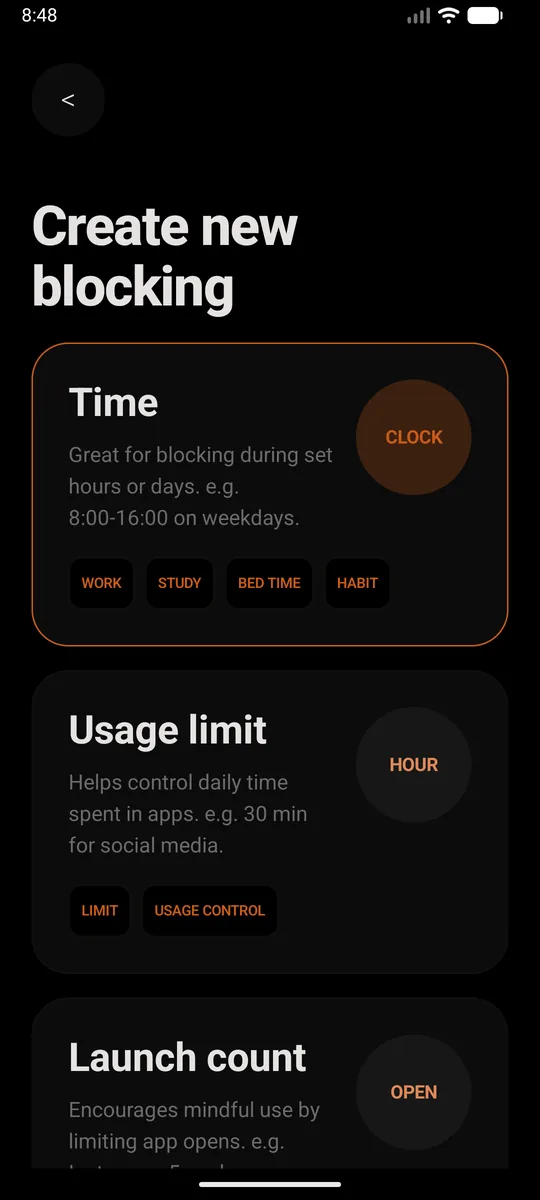
- Create a new block. Pick Time if you want Discord gone during set hours, like school nights or bedtime. Pick Usage limit if you'd rather allow a little each day, say 30 minutes. Or just set it to all day, every day.
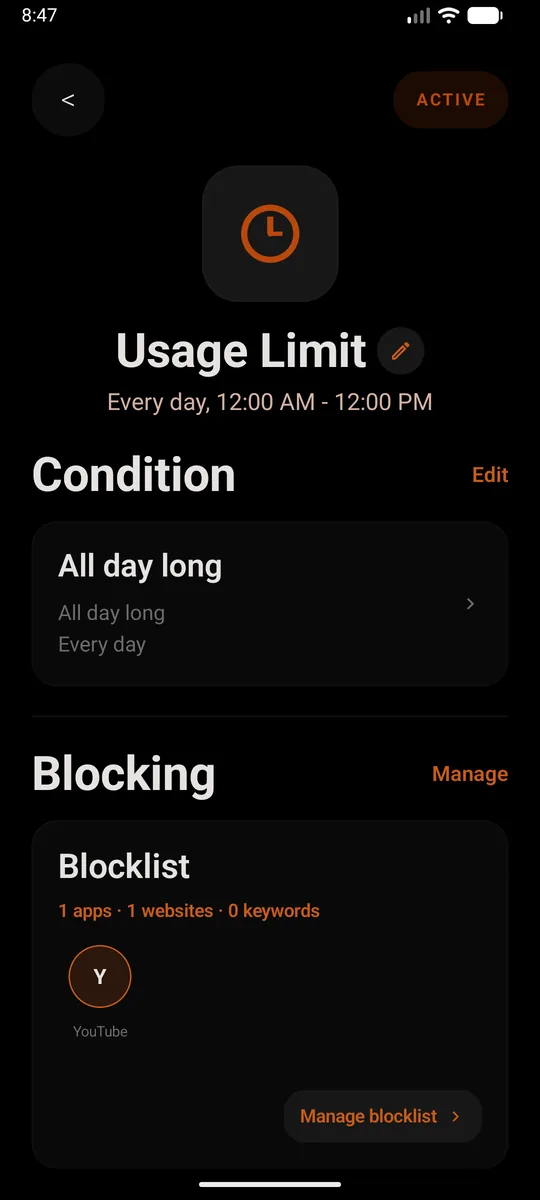
- Add Discord to the blocklist. Add the app, then add
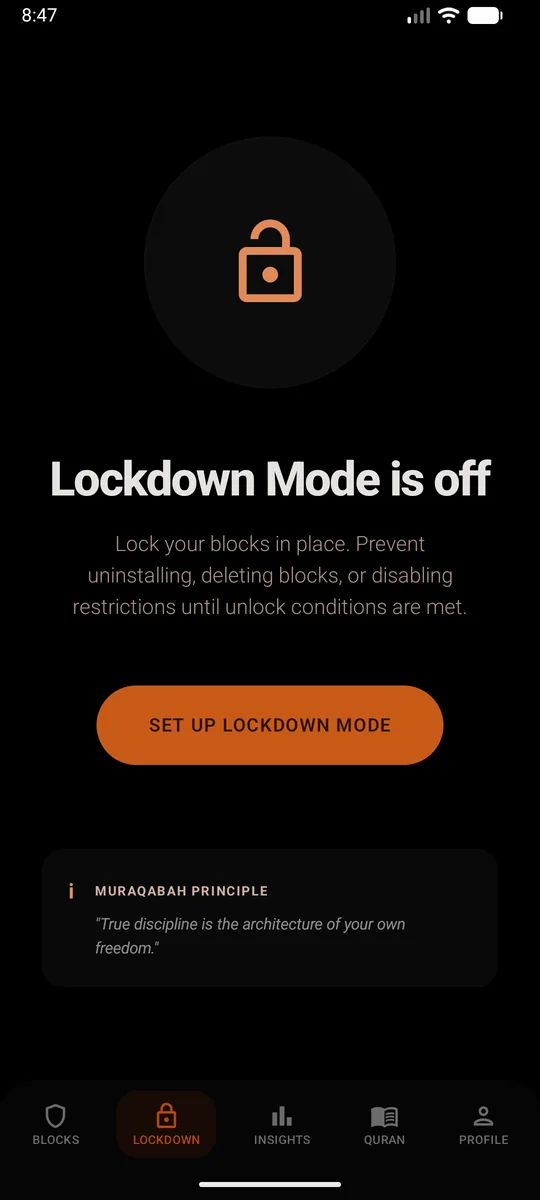
discord.comas a website too. Skip that second part and the browser becomes the back door. From then on, opening Discord closes it straight away and shows a reminder instead. - Set a PIN and turn on Lockdown Mode. This is the bit that makes it stick. Lockdown Mode stops the block being deleted, the restrictions being switched off, or Sunnah Lock being uninstalled until your unlock conditions are met.
Without installing anything
Google Family Link can set app limits on your child's phone from your own: Screen time, Time limits, App limits, then pick Discord.4 It covers the app. discord.com in other browsers stays open.
How to block Discord on iPhone
- Get Sunnah Lock from the App Store.
- Build a block. Start from a ready-made template like Night or Home, or build your own from scratch.
- Add Discord to it, and put
discord.comon your website list. That covers the app and the site, so Safari doesn't turn into the back door. - Keep the adult content filter on. It's Apple's own filter, and the block is enforced by iOS itself, so it isn't a setting you can talk yourself out of at midnight.
Without installing anything
If your child's iPhone is in your Family Sharing group, you can set a Time Allowance for Discord. When it runs out, your child can "tap One More Minute or send a request for more time," and the request comes to you.5
A setup that works for a lot of families
- Younger kids: block Discord all day until you've talked about who they'd be chatting with.
- Older teens: a Time block during school hours and another from 9:30pm to 7am, so the notifications stop at night.
- Either way: Lockdown Mode on, PIN kept to yourself.
Discord often comes paired with a game. If that's Roblox, see how to block Roblox.
Questions people ask
How do I block Discord on my child's phone?
Install Sunnah Lock on your child's phone, block the Discord app and discord.com, then turn on Lockdown Mode with a PIN only you know. On Android that also stops Sunnah Lock being uninstalled. On iPhone, Sunnah Lock blocks the app and the website, enforced by iOS itself.
Does Discord have parental controls?
Discord has Family Center. As of its November 2025 update, a parent can see their teen's purchases from the past week, how long they spent on voice and video calls, and the five users and servers they interacted with most. Parents can also restrict who can message their teen and filter sensitive content. It has no daily time limit.
Is Discord safe for kids?
New Jersey's attorney general sued Discord in April 2025, alleging it misled parents about how well its safety settings work and exposed children to sexual and violent content and online predators. For younger kids, blocking Discord is the safer default.
Why does my child get so many Discord notifications?
In a Common Sense Media study that tracked 203 kids' phones, Snapchat and Discord sent the most notifications of any apps, with some kids getting hundreds a day from them. A time-based block keeps those messages from waking them up at night.
Can kids use Discord without the app?
Yes. Discord works at discord.com in a browser, so blocking only the app leaves it open. Block the website too.
Should I block Discord completely or just at night?
If your child uses Discord with school friends you know, a Time block for school hours and bedtime may be enough. If you don't know who they talk to there, a full block is safer until you've had that conversation.
Make the block actually hold
On Android, Sunnah Lock blocks apps, websites and keywords, with PIN-protected settings and Lockdown Mode to keep it in place. On iPhone it blocks apps, websites and whole categories, enforced by iOS itself.
Block something else
Sources
- Constant Companion: A Week in the Life of a Young Person's Smartphone Use Common Sense Media, 2023
- AG Platkin Sues Messaging App Discord for Unlawful Practices That Expose NJ Kids to Child Predators and Violent, Sexual Content New Jersey Office of Attorney General, April 2025
- Discord's Family Center update now lets parents monitor weekly purchases TechCrunch, November 2025
- Set app time limits on your child's device Google For Families Help
- Family Sharing and parental controls overview for kids and teens Apple Support, September 2026